Production control for roadway construction

Know today if you're behind. Not next Thursday.

Hobon is a mobile-first production control app for horizontal construction. Your superintendent reports placed quantities by station from his phone, standing on the job. You see quantity, dollars and schedule the same day — not after somebody types it up.

  • Quantities by station and lane, from the field
  • Planned vs. placed vs. billed, the same day
  • Every lost day logged with its backup
  • Keeps working where there's no signal

On the App Store for iPhone and iPad.

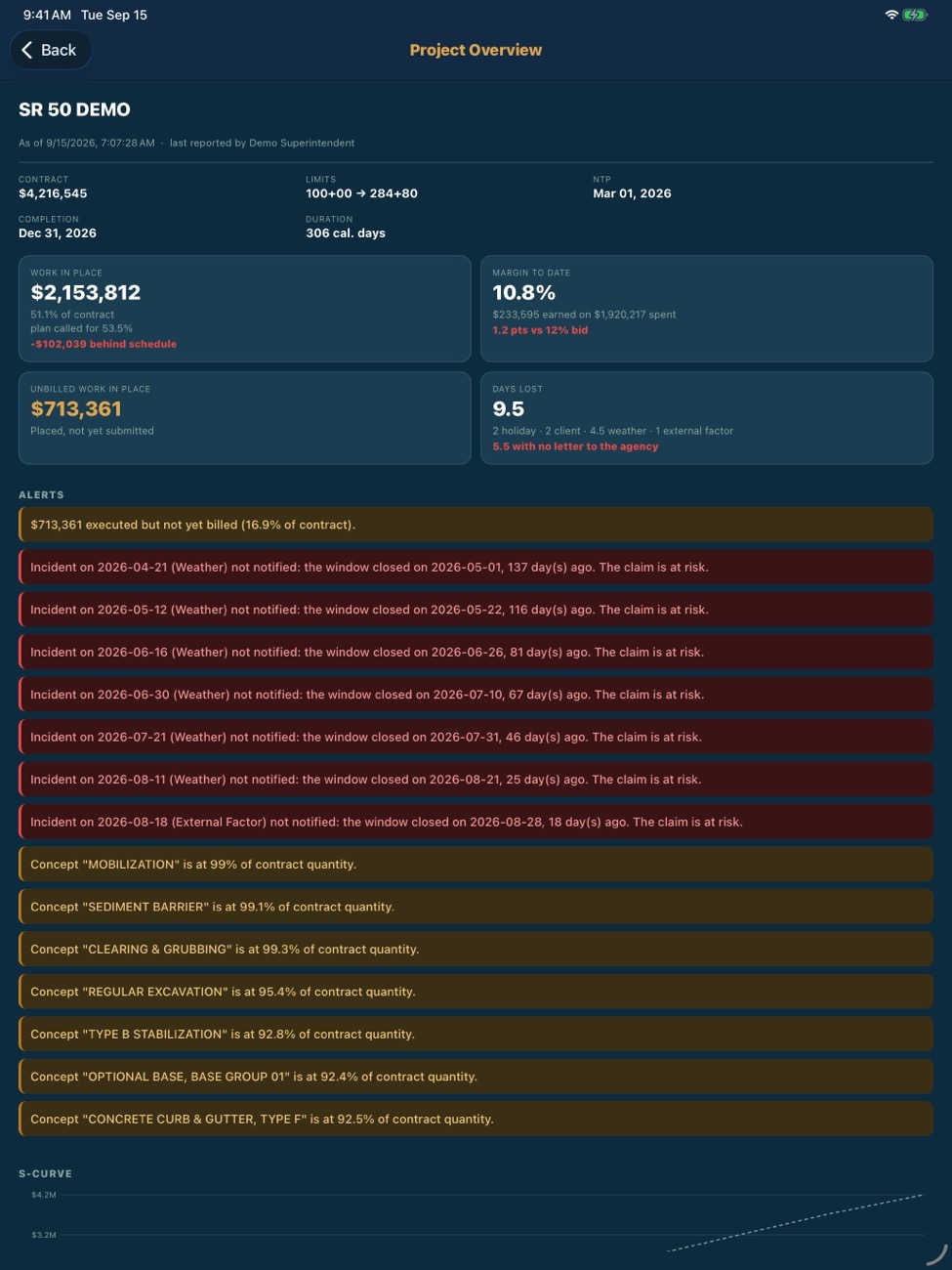
Hobon Project Overview on iPad: work in place, margin to date, unbilled work and days lost for a demo project.
Hobon progress capture on iPhone: quantity, station start and end, and lane for a Superpave pay item.

Demo project · FDOT pay items, illustrative progress and costs

FDOT pay items US stationing · 118+00 English & Español iPhone & iPad Works without signal

Sound familiar?

Three things that cost you money before anybody notices.

Today's quantities are in a field book, a text thread, and somebody's truck. They reach the office Thursday.
The same station got reported twice, and you found it at the pay estimate.
You lost eleven days to weather this season, and you can prove nine.

The product

The field and the office, on the same numbers the same day.

The superintendent works on his phone. The project manager has the whole job on an iPad. The web panel is for the office: loading the contract and correcting entries.

Reported from the job, not the trailer.

Pay item, quantity, station start and end, lane. If a station was already reported, the app says so on the spot — who and when — and asks you to call it: billable to the owner, or your cost.
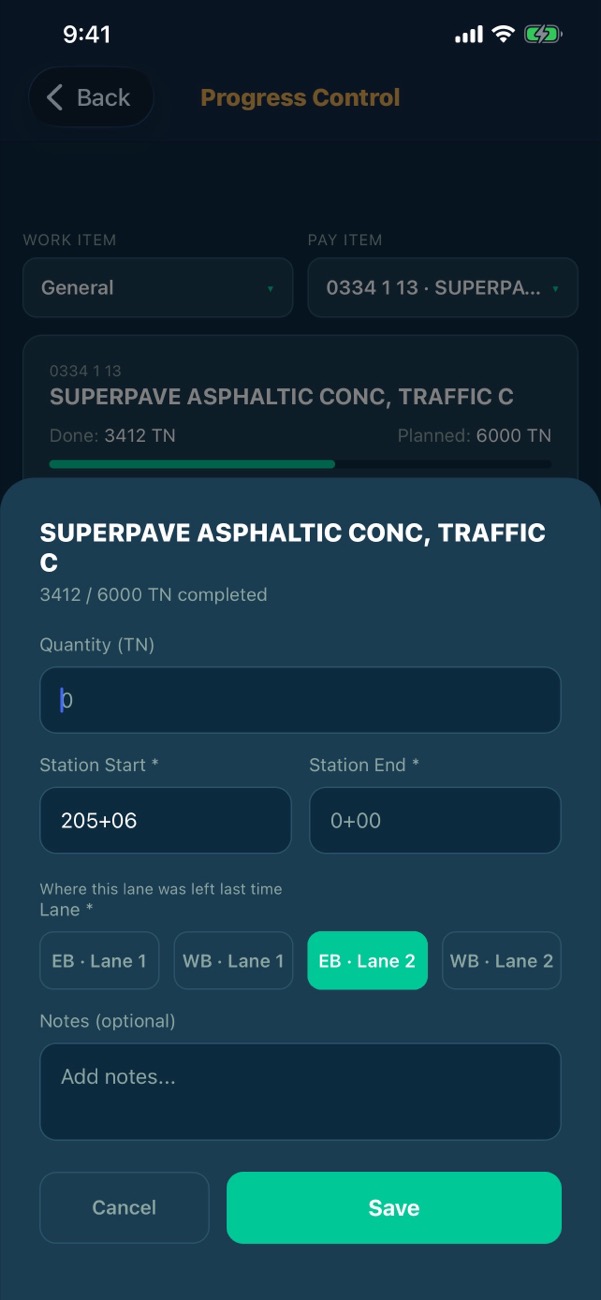
Progress capture form with quantity, stations and lane selection.

Station by station, lane by lane.

Hobon tracks work from station to station, by roadway and lane — the way the job is actually built, measured and paid. Not markups on a PDF plan sheet.
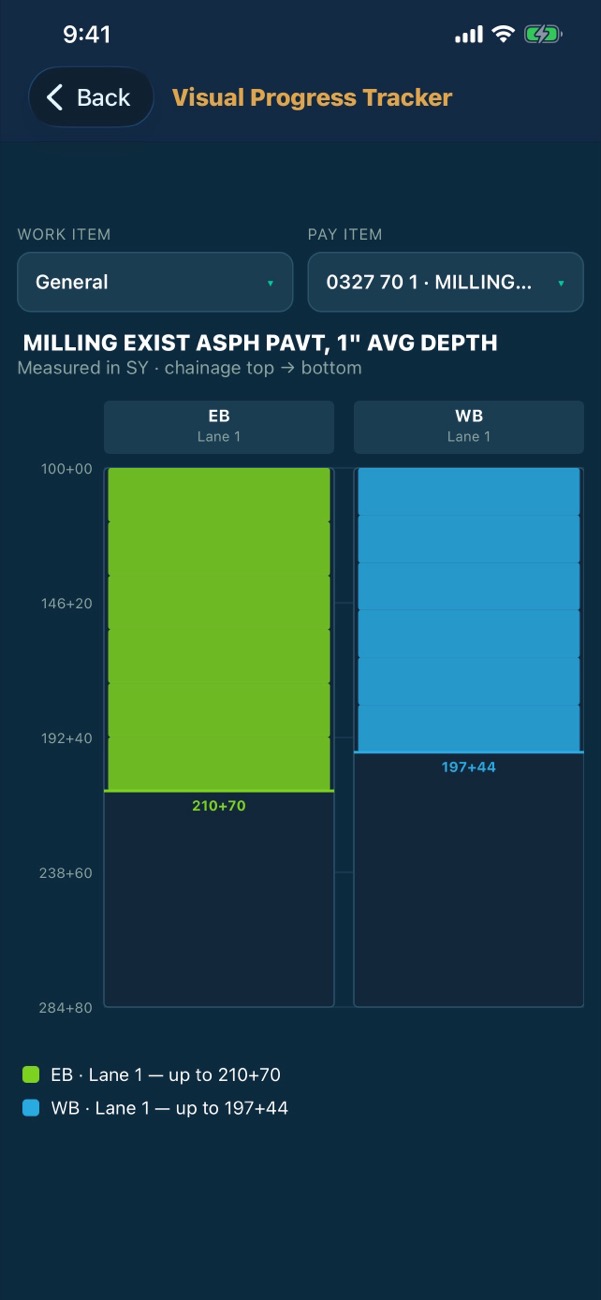
Visual Progress Tracker showing milling placed eastbound to 210+70 and westbound to 197+44.

The whole job on one screen.

Work in place against the plan, margin to date against the bid, work placed and not yet billed, days lost — and the alerts that tell you which one to look at first.

Project Overview with contract, work in place, margin, unbilled work and days lost.

Every lost day, with its backup.

Every non-working day by cause: holiday, owner, weather, outside factor. Full day or half. Backup is attached when it happens — minutes, photos, documents, letter number — and the summary shows which days still have none, while you can still go get the paper.
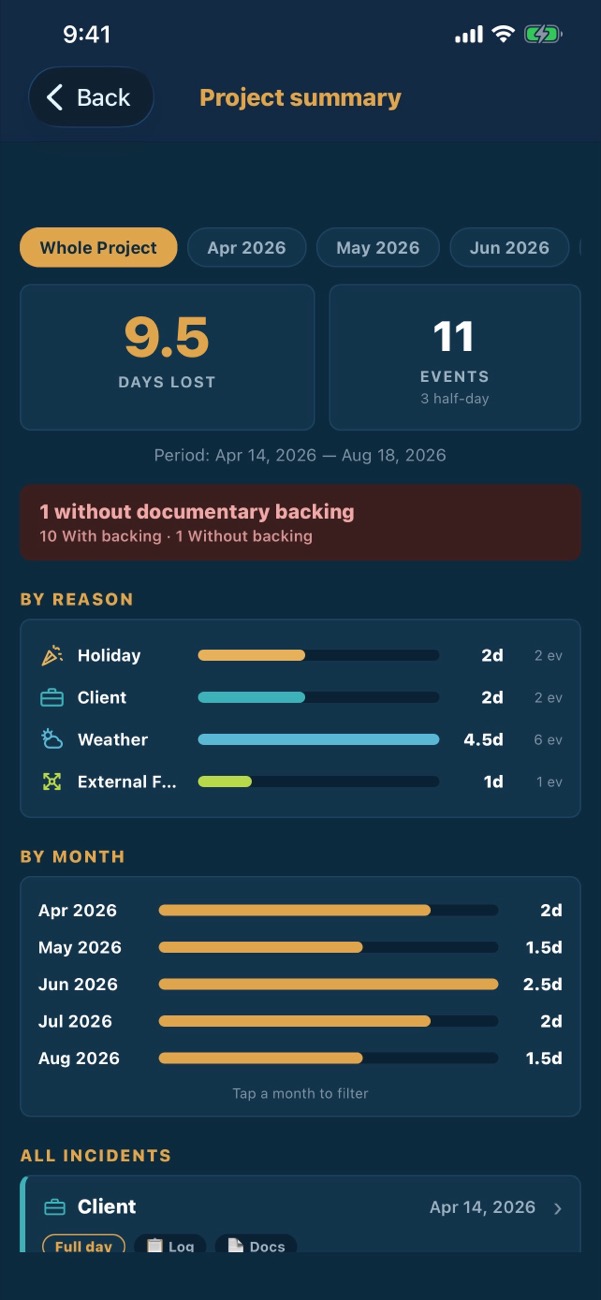
Days lost summary: 9.5 days by reason and by month, with one day lacking backup.
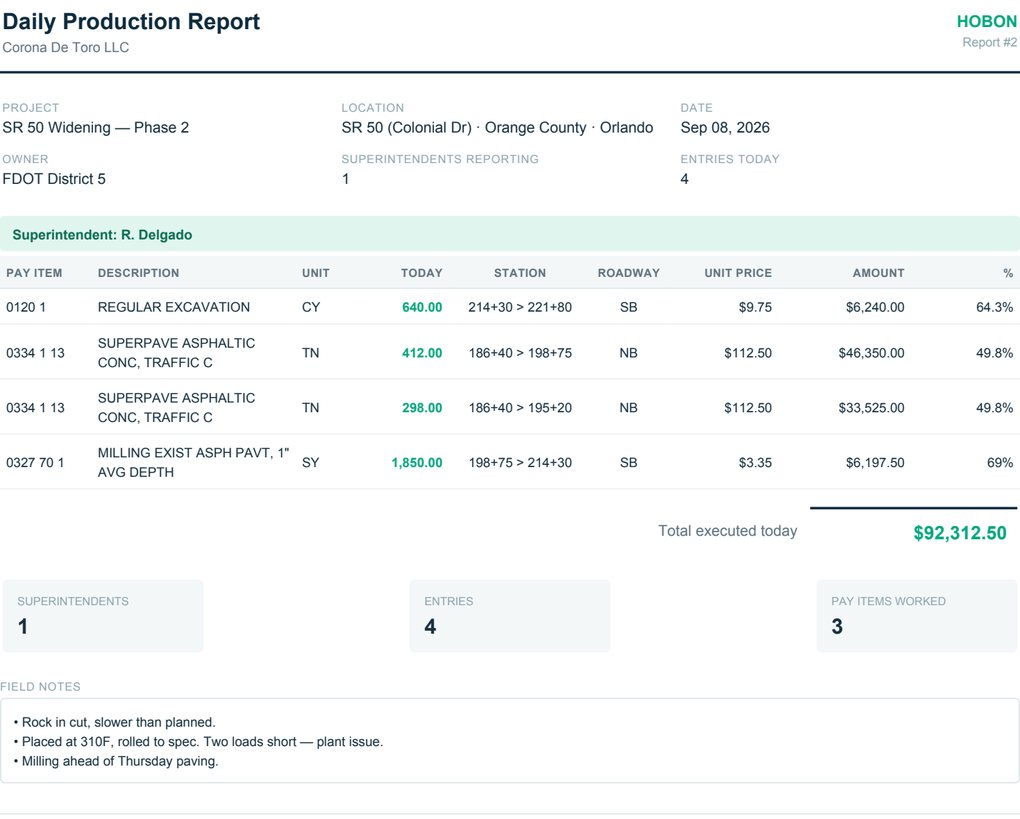
Daily Production Report for SR 50 Widening — Phase 2, showing four pay items placed on Sep 08 2026 with station limits, unit prices and percent complete.
Daily Production Report, generated from the field in one tap. Real screen from the app, demo data — FDOT pay items, US units, stationing.

What you get

Three documents your job already runs on.

Every day

Daily Production Report

One tap, from the field, as a PDF. Production by pay item, quantities, station limits, quantity to date, percent complete, field notes. Done before he leaves the job — not back at the trailer at 8pm.

Every owner's meeting

Management Report

Planned vs. placed vs. billed. This period and to date. In quantity, in dollars, in percent, with the variance called out.

Every pay period

Progress Billing

Your pay estimate, built from the same daily entries the superintendent already made. By pay item, unit, quantity and station limits. Nobody rebuilds it in Excel.

Why it's not the software you already turned down

Built the way the job is measured and paid.

It's built on stationing.

Work is recorded from station to station, by roadway and lane, in US stationing. The strip map shows exactly where each pay item has reached — and where it hasn't.

The field never opens a laptop.

The superintendent works on his phone; the project manager who wants the whole job on one screen has it on an iPad. English or Spanish, per user, on the same job.

It catches double-reported work the moment it happens.

That's the difference between a change order and a write-off you find in month three.

Also in the app

The rest of what a job runs on.

Automatic alertsNo activity for N days; a superintendent who has gone quiet while the rest of the crew keeps reporting; plan-vs-placed deviation over your threshold; gap between placed and billed; a pay item running out of contract quantity before the work is done; and the days left to notify a delay before the contract's window closes. You set every threshold.
No signal, no problemOut where there's no coverage, production and cost entries are saved on the phone and sent on their own the moment there is — and a retry after a dropped reply never bills the same quantity twice. If something stays stuck more than a day, the app says so. Reading reports still needs a connection.
Your numbering, not just FDOT'sOn an FDOT job the pay item number is enough to know what each item builds. On a county, city or out-of-state contract it isn't, so Hobon reads the descriptions instead and places about three out of four items on its own. Every one it places is flagged for somebody to confirm — it proposes, it never decides quietly.
S-curvePlanned, placed and billed on one chart.
Cost controlDirect and indirect WBS budget, incurred cost, job P&L.
Change ordersResource breakdown with document backup.
Excel importYour pay items, schedule and budget load from a template. You don't retype the contract.

The pilot

Try it on a job you're running now.

Free. 60 to 90 days.
One project you pick.
Start with twenty minutes
  • We do the setup. Send us the files you already have — pay item schedule, project schedule, budget — and we load them.
  • What we ask in return: your crew actually uses it in the field, one designated contact, and 30 minutes with us every two weeks.
  • Your data is yours. Export it any time, including if you walk away.
  • No price discussion during the pilot and no obligation to continue after it.

Who we are

Early, and saying so.

Hobon is early. We have no client logos to show you, because you'd be among the first. It's built by a project manager with twenty years on highway jobs, and we're developing it with a small number of contractors in Florida — what you tell us in those biweekly calls is what gets built next.

If you want finished software from a large vendor, that's Procore, and it will cost you accordingly. If you want a production tool that works the way your job is actually measured, and a say in how it works, this is the window.

Talk to us

Twenty minutes. Your jobsite or a call.

Bring one active project — we'll show you exactly what your first week on Hobon looks like.

Samuel Corona Managing Director (689) 284-5093 samuel.corona@hobonapp.com Email us